Overview
The Cashbook takes every transaction booked in Income and structures it by payment type, giving you a clear, running picture of your cash and card positions at any point in time.
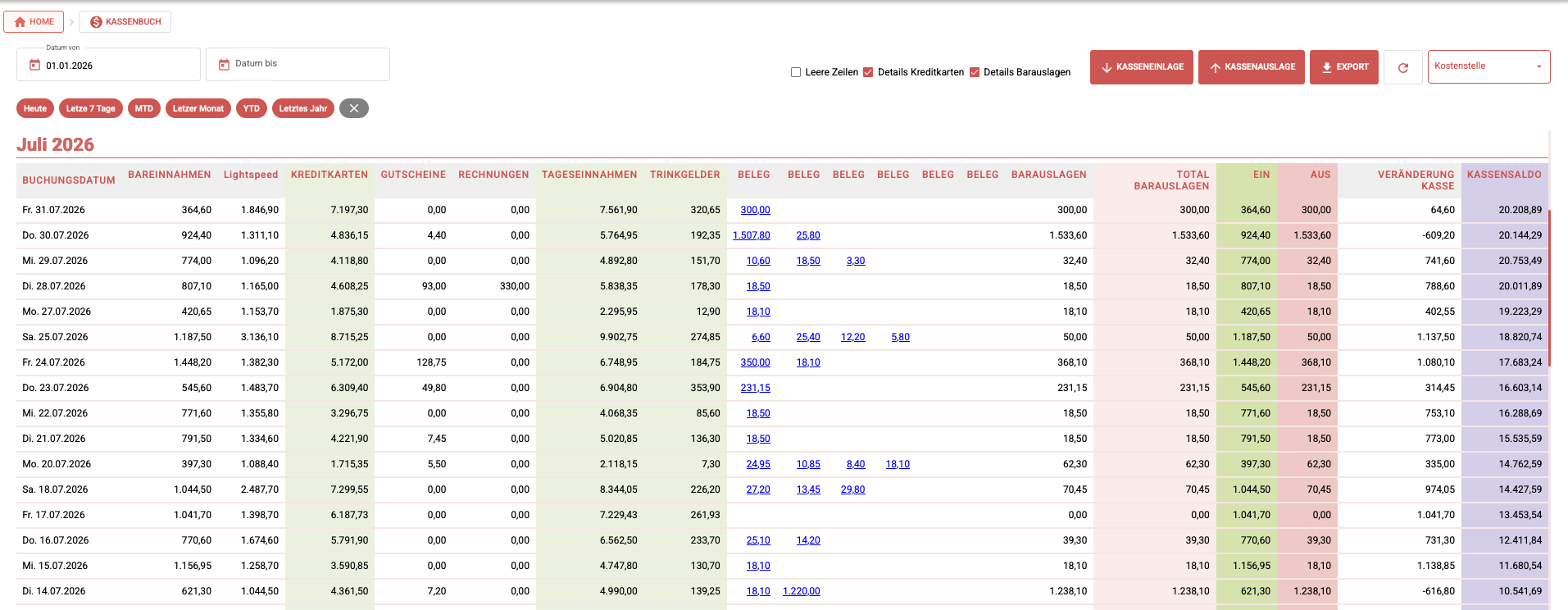
→ See Income for how transactions reach the Cashbook.
Recording cash deposits and withdrawals
Beyond the transactions that flow in automatically from Income, you can book cash movements directly in the Cashbook:
- Cash deposits (Kasseneinlagen) — for example, float top-ups or owner deposits into the till.
- Cash withdrawals (Kassenauslagen) — for example, petty cash payouts or cash taken to the bank.
Recording these directly keeps your physical cash position in sync with your books.
- Open the Cashbook.
- Click New entry.
- Choose Deposit or Withdrawal.
- Enter the amount and the account.
- Save.
For a full click-by-click walkthrough, see How to Manage Cash Transactions in PINIT.
Configuration
The Cashbook's structure — which payment types appear and how they're grouped — can be individualized to fit your business. Because this depends on your chart of accounts and payment-type mapping, it needs to be set up together with the PINIT team.
Contact us to configure and activate the Cashbook for your tenant.
Filtering and exporting
Filtering and exporting in the Cashbook work exactly like the Journal: narrow the view by date range or column selection, then export the result as CSV.
→ See Journal for the full filtering and export reference.
Frequently Asked Questions
What is the Cashbook in PINIT? A structured, payment-type breakdown of every transaction booked in Income, with support for manually recording cash deposits and withdrawals.
How is the Cashbook different from the Journal? The Journal lists every booking across your tenant. The Cashbook focuses specifically on Income transactions, structured by payment type, plus manual cash movements.
Can I book a cash deposit or withdrawal that isn't tied to a sale? Yes. Use New entry in the Cashbook and choose Deposit or Withdrawal — useful for float top-ups, petty cash payouts, or bank deposits.
Is the Cashbook available by default? Its configuration is individualized per tenant. Contact us to have it set up and activated.
Can I export the Cashbook? Yes. Filtering and export work the same way as the Journal — export the current filtered view as CSV.